
Should Credit Card Payments Count in Your Budget?
Here's a question we hear a lot: when you pay off your credit card, is that spending?
In Weekly, the answer is no, as long as your credit card is linked. The spending happened when you swiped the card. Each of those charges came into Weekly and counted toward your week when you made it. The payment at the end of the month just settles the bill. If Weekly counted the payment too, you'd be counting the same groceries and gas twice.
The same goes for moving money between your own accounts, like a transfer from checking to savings. The money didn't go anywhere. It just moved.
Until now, the way to handle these in Weekly was to choose Ignore. It worked, but it was a catch-all, and it left a lot of people unsure where card payments and transfers belonged. Weekly 4.9.2 fixes that.
What's New in Weekly 4.9.2
Ignore is now Not in budget
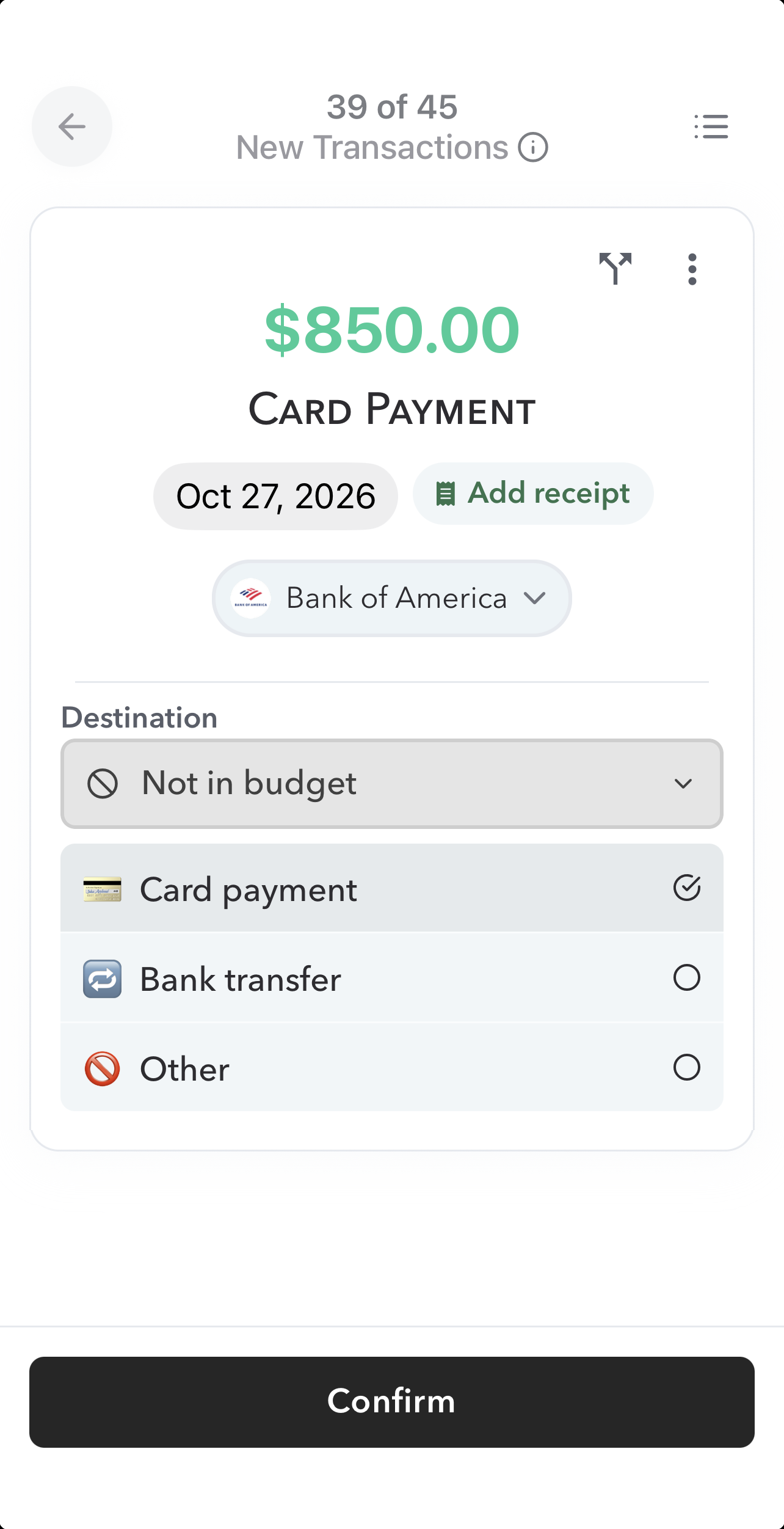
Same choice, clearer name. "Ignore" sounded like Weekly was skipping something, and its pink color made it look like a mistake. "Not in budget" says what actually happens: this money stays out of your budget. It now shows in a calm gray.
Your totals don't change. Transactions you ignored before now show as Not in budget.
Pick a reason
When you choose Not in budget, you can now say why:
- Card payment: paying off a credit card
- Bank transfer: moving money between your own accounts
- Other: anything else you want to keep out of your budget
How to Use Not in Budget
- Open a transaction to review it.
- Under Destination, choose Not in budget.
- Pick a reason: Card payment, Bank transfer or Other.
- Tap Confirm.
When you pay off a card, you'll usually see two transactions: the payment leaving your checking account, and the matching payment arriving on your credit card. Mark both as Not in budget, with the reason Card payment.
One Important Exception
This only works when your credit card is linked to Weekly. If it isn't, Weekly never sees the charges you made on the card, so the payment is the only place that spending shows up. In that case, don't mark the payment Not in budget. Count it toward your Safe-to-Spend, or link the card.
Carrying a balance? If part of your payment goes toward paying down debt, our guide to paying off credit card debt shows how to set that up.
Get the Update
Not in budget is available now in Weekly 4.9.2 on iPhone and Android. If you don't see it yet, update Weekly from the App Store or Google Play.
Questions? Drop us a line at support@weeklybudgeting.com. We'd love to hear how it's working for you.
Happy budgeting!